Incremental multimodal data pipelines with CocoIndex and LanceDB
Transform a multimodal product dataset with nested fields into fresh, searchable, agent-ready context in LanceDB.
In software engineering, there’s no better way to understand deeply how something works than to build with it. 🛠️
In the last post, I covered the 5 design principles of CocoIndex ⤴, and why it really resonates with me as a developer who loves building with open source tools. I promised a follow-up with real code, so here we are. But this post is not another “RAG demo” (which is simple enough with coding agents these days). What’s more important is how the underlying data is kept current as the world, the code and the data models are continuously changing around it, as well as the core primitives CocoIndex provides to address this problem.
As a concrete example, we’ll build a multimodal retrieval pipeline in LanceDB ⤴. The task is to use CocoIndex to turn a pile of raw nested product data and catalog images into a fresh, multimodal LanceDB table, searchable by text or image similarity. LanceDB is a natural fit for this use case because it can hold vectors, source metadata, and multimodal payloads side by side, including versioning and schema evolution.
I’ll walk through how I think about constructing a CocoIndex pipeline end to end: what “data freshness” means, how it maps onto CocoIndex primitives, and how these well-designed pieces come together cohesively on a real-world task.
What constitutes data freshness?#
Recall from the previous post that CocoIndex is an embedded runtime that sits in between your raw data sources and targets.
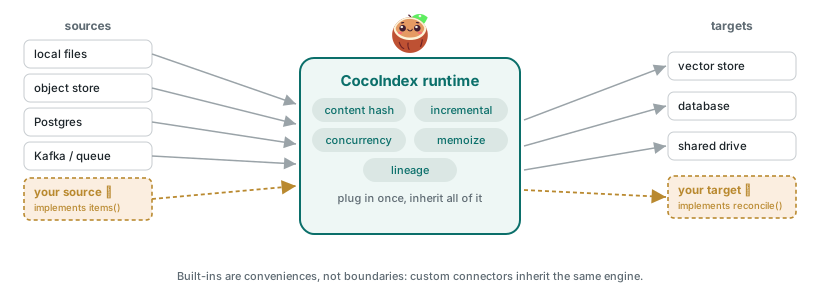
As the list below shows, freshness is not just about the data itself: the entire pipeline (including logic) matters. This is why the incremental-first approach taken by CocoIndex is well-suited to handle this problem1.
There are many ways in which data that agents rely on can go stale:
- New records or files are added. The data source changed, but the target doesn’t know about a product, image, or blob that now exists in the source.
- Existing records are modified or deleted. The source changed, but outdated fields, stale embeddings/derived fields, or deleted objects keep answering queries.
- Transformation logic changes. The source is unchanged, but your parsing, normalization, embedding, or feature enrichment code now means something different.
- Target schema changes. The source is unchanged, but the record shape you want to maintain in the target has evolved, often because the transformation logic now produces new or different fields.
The demo below will cover each of these scenarios, showing how CocoIndex incrementally tracks changes and keeps the target in sync with the source.
The source data: Amazon Berkeley Objects#
Our realistic example uses a slice of the Amazon Berkeley Objects ⤴ dataset (ABO): ~148k real product listings from Amazon’s catalog, each with metadata and images, making it just the right multimodal dataset to demonstrate what we want. The dataset is available under a CC BY 4.0 ⤴ license2, and a single record looks like this:
{
  "item_id": "B07B4DBQ8L",
  "item_name": [
    { "language_tag": "en_US", "value": "AmazonBasics Mid-Back Mesh Office Chair" },
    { "language_tag": "de_DE", "value": "AmazonBasics Bürostuhl mit Netzrücken" }
  ],
  "brand": [{ "language_tag": "en_US", "value": "AmazonBasics" }],
  "bullet_point": [
    { "language_tag": "en_US", "value": "Mid-back mesh office chair with lumbar support" },
    { "language_tag": "en_US", "value": "Breathable mesh back keeps you cool" }
  ],
  "product_type": [{ "value": "CHAIR" }],
  "color": [{ "language_tag": "en_US", "value": "Black" }],
  "main_image_id": "81dckl1cInL",
  "other_image_id": ["71abcDEf2gL", "61ghiJKl3mL"]
}
Each product’s information is nested and irregular (not every field is present). On disk, the source is just a directory of listings and their images:
data/abo/
├── listings/   # product metadata, one JSON object per product
└── images/     # catalog images, referenced by main_image_id / other_image_id
Only 1,000 products from the “shoes” category are used in the demo: this easily runs on a laptop, but the same methodology should scale to the full dataset.
The goal is simple: we want LanceDB as the single storage layer (text, metadata, vectors, and the image bytes), so that a downstream retrieval app can get everything it needs by querying from this target. And we want CocoIndex to manage data freshness, keeping the LanceDB target in sync with the source as the source or compute logic changes. In the real world, you can imagine the source as an API or an external data feed, with the product catalog being updated continuously.
This gives us a clean separation of concerns:
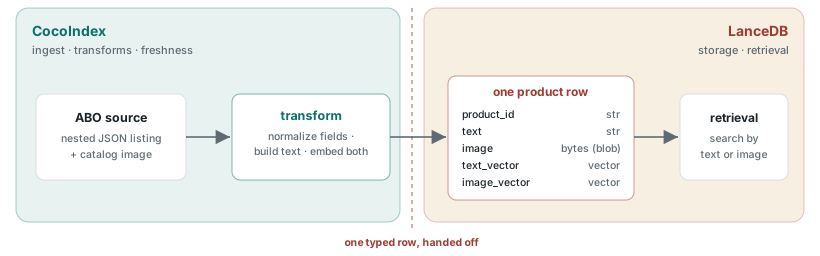
CocoIndex handles everything from the raw source up to a ready-to-store record: loading listings and images, normalizing fields, building the retrieval text, and computing the text and image embeddings, all while tracking what changed. LanceDB takes it from there, keeping each row’s vectors, metadata, and image bytes together, building the vector and full-text indexes, and serving queries. We don’t have to wire up that hand-off ourselves: CocoIndex ships a built-in LanceDB target ⤴, so declaring the table and writing rows to it is a native part of the pipeline.
The pipeline is declarative3 by design: we describe what should be true of the target (one fresh, fully typed row per product in the target, kept in sync with the source) and let CocoIndex manage the how.
What are CocoIndex’s core primitives?#
Before writing any code, it’s important to build a mental model of the core primitives CocoIndex provides. The top-level abstraction is the “app” that does all the processing work, while the source and target are external to the app, handled via connectors.

The following list breaks down the role of each element in the diagram above:
- App: the top-level runnable unit that contains the definition of the pipeline. It owns startup, shutdown, resource bindings, mounted processing components, and watches the sources and targets to decide when/what to update.
- Source: the raw source data CocoIndex can observe and fingerprint. In our example, that’s the directory to the local ABO listing JSON and catalog images.
- Processing component: the unit of incremental execution inside the app. Can be defined at a coarse, medium, or fine level, depending on the granularity of the work we want to accomplish. For this example, it’s defined at the level of each product listing.
- Function: a standard Python function, but managed by the CocoIndex engine so it can track and memoize work. Functions contain the actual execution logic to parse, normalize, enrich, embed, and build the target row as required.
- Target: The external system you write data to. It’s paired with a target state, i.e., a declaration of what you want to exist in your target. In this example, the target is LanceDB ⤴, an embedded multimodal retrieval library.
With these basics, we can start building on these primitives from the outside in.
Build a CocoIndex app#
The app is the top-level functional unit of a CocoIndex pipeline. It’s where all the processing work happens, where we tell CocoIndex how to find the source data, where its incremental state should go, and how the pipeline can reach the target (in this case, LanceDB).
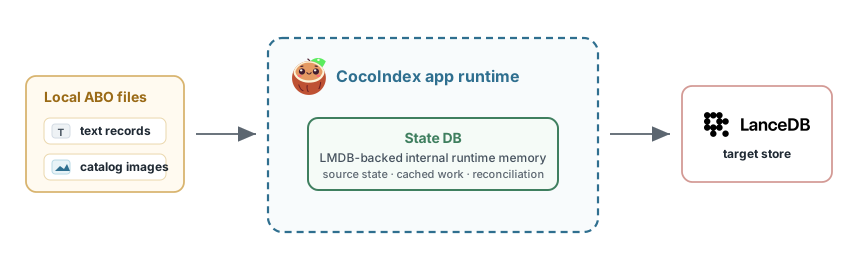
There are three main concepts to understand when defining an app:
-
State DB: CocoIndex’s runtime uses an internal DB that tracks source state, cached function outputs, and reconciliation metadata so future runs can update only what changed. Locally, CocoIndex uses LMDB by default, which is an embedded key-value store: lightweight, fast, and serverless. For production workloads in its Enterprise version, Postgres can be configured instead.
-
Lifespan: This is CocoIndex’s runtime lifecycle hook, similar to FastAPI’s
lifespanfor a web app. It gives us one place to set up shared resources before processing starts, such as creating directories, pointing CocoIndex at its state DB, and opening the LanceDB connection. When the runtime stops, the same lifecycle can handle teardown. -
Context: This provides a context mechanism for sharing resources across the app, via the
ContextKey. In this case, the LanceDB connection should be available to the app without being passed through every transformation function.
The app shell is just a few lines of code, but it sets up the runtime environment for the rest of the pipeline. Here’s what it looks like by using the built-in LanceDB connector and a few other CocoIndex primitives:
from collections.abc import AsyncIterator
from pathlib import Path

import cocoindex as coco
from cocoindex.connectors import lancedb as coco_lancedb

DATA_DIR = Path("data")
ABO_DIR = DATA_DIR / "abo"
LISTINGS_DIR = ABO_DIR / "listings"
IMAGES_DIR = ABO_DIR / "images"

COCOINDEX_STATE_DB = DATA_DIR / "cocoindex" / "state.lmdb"
LANCEDB_URI = DATA_DIR / "lancedb"
APP_NAME = "abo-shoes-lancedb"

LANCEDB = coco.ContextKey[coco_lancedb.LanceAsyncConnection]("lancedb")


@coco.lifespan
async def coco_lifespan(builder: coco.EnvironmentBuilder) -> AsyncIterator[None]:
    builder.settings.db_path = COCOINDEX_STATE_DB
    conn = await coco_lancedb.connect_async(str(LANCEDB_URI))
    builder.provide(LANCEDB, conn)
    # (the text and image embedders get provided here too, shown later)
    yield


@coco.fn
async def app_main() -> None:
    ...


app = coco.App(coco.AppConfig(name=APP_NAME), app_main)


def main() -> None:
    app.update_blocking()
Define the data models#
The next step is to declare our desired schema: what shape the data should have inside the pipeline, and at the target boundary.
This is the first place where it becomes clear how CocoIndex treats nested data as first-class (not forcing you to flatten everything into tables/DataFrames upfront). It’s much easier to turn the messy ABO product source object into a clean, similarly shaped object, while continuing to work with that object through the transformation chain, and only flatten it at the end when we declare the LanceDB row. All the while, CocoIndex maps the Python types to native Rust types under the hood for best performance.
For this example, the data model can use simple Python dataclasses:
from dataclasses import dataclass
from typing import Annotated

import numpy as np
from cocoindex.ops.sentence_transformers import SentenceTransformerEmbedder
from numpy.typing import NDArray

TEXT_EMBEDDING_MODEL = "sentence-transformers/all-MiniLM-L6-v2"
IMAGE_EMBEDDING_MODEL = "clip-ViT-B-32"

# Shared embedders, bound once in the lifespan and reached through context.
TEXT_EMBEDDER = coco.ContextKey[SentenceTransformerEmbedder](
    "text_embedder", detect_change=True
)
IMAGE_EMBEDDER = coco.ContextKey[ClipImageEmbedder]("image_embedder", detect_change=True)

# Each vector column infers its dtype and size from the embedder behind its key.
TextVector = Annotated[NDArray[np.float32], TEXT_EMBEDDER]
ImageVector = Annotated[NDArray[np.float32], IMAGE_EMBEDDER]


@dataclass(frozen=True)
class Product:
    product_id: str
    domain_name: str
    title: str
    brand: str | None
    product_type: str | None
    bullets: list[str]
    color: str | None
    material: str | None
    style: str | None
    main_image_id: str
    main_image_path: str


@dataclass(frozen=True)
class ProductRow:
    product_id: str
    domain_name: str
    title: str
    content: str
    product_type: str | None
    brand: str | None
    image_path: str
    image_bytes: bytes
    text_embedding: TextVector
    image_embedding: ImageVector
    metadata_json: str
There are two different dataclasses here:
Productis the normalized source model. It’s as per the source object shape in the JSON data. The raw ABO listing can have multilingual unicode string fields, optional lists, missing attributes, and image IDs that need to be resolved.Productgives the rest of the pipeline a predictable shape to work with.ProductRowis the LanceDB handoff model. This is the retrieval-ready row, and the schema that the LanceDB table will use: stable product identity, human-readable content, scalar metadata, image bytes, and two vector columns.
We embed the text with all-MiniLM-L6-v2 and the image with CLIP clip-ViT-B-32. Instead of hard-coding their output dimensions (384 and 512), the vector annotations let CocoIndex read each dimension from the embedder and fix it in the schema upfront.
Once we have the data models defined, CocoIndex can derive the LanceDB table schema from it:
TABLE_NAME = "abo_shoes"


@coco.fn
async def app_main() -> None:
    table_schema = await coco_lancedb.TableSchema.from_class(
        ProductRow,
        primary_key=["domain_name", "product_id"],
    )
    target = await coco_lancedb.mount_table_target(
        LANCEDB,
        TABLE_NAME,
        table_schema,
    )
Under the hood, TableSchema.from_class maps the ProductRow dataclass into the PyArrow ⤴ schema that LanceDB expects, since LanceDB is built on Arrow’s type system. Any translation lives inside the connector itself, which you can read more about in the LanceDB connector docs ⤴.
This shows the flexibility of CocoIndex’s design: target-specific logic is the connector’s responsibility, and isn’t defined in the app’s boilerplate, keeping things clean.
mount_table_target then sets the target as a LanceDB table: CocoIndex knows all expected data types in each row, and through the connector, keeps the LanceDB table in sync with that declared state. It also handles table maintenance for us: instead of asking LanceDB to compact ⤴ after every tiny handful of row commits, the connector batches maintenance automatically, based on LanceDB’s own table and index state.
Create the transformation functions#
Now that the target is set up, we can define the functions that transform the source into that shape.
A CocoIndex function is just a standard Python function, wrapped in a @coco.fn decorator. This gives it additional capabilities like change detection, memoization, dependency tracking and async or GPU-based execution.
For this pipeline, the natural transformation steps look like this:
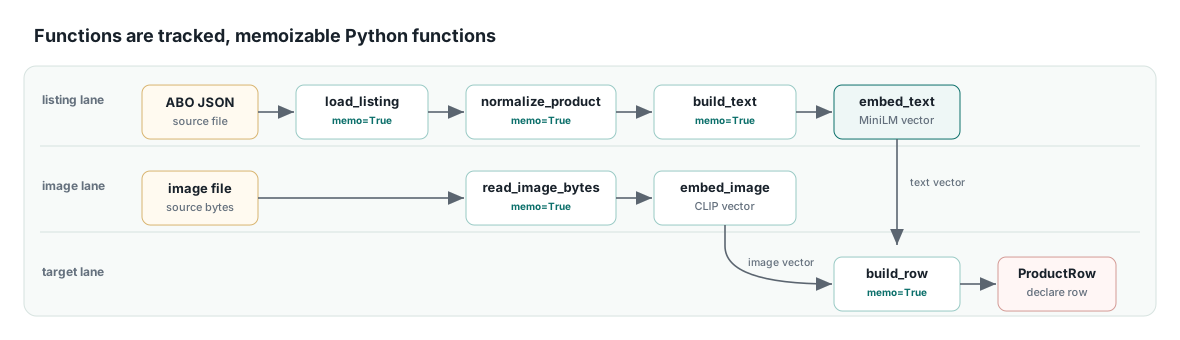
A lot of CocoIndex’s incremental approach boils down to smart caching and memoization (i.e., reusing computation that doesn’t need to be repeated). Take embedding models as an example - they’re expensive to load, so instead of loading them on every call, we bind them once in the lifespan and reach them from any function through a shared ContextKey. CocoIndex ships a SentenceTransformer text embedder which works well for our use case. For images there’s no built-in equivalent, so we write a small one ourselves that uses CLIP embeddings:
class ClipImageEmbedder(VectorSchemaProvider):
    """A CLIP image encoder shaped like CocoIndex's built-in text embedder."""

    def __init__(self, model_name: str) -> None:
        self._model_name = model_name
        self._model: SentenceTransformer | None = None
        self._lock = threading.Lock()

    def __coco_memo_key__(self) -> object:
        # Swapping the model invalidates every memo that embedded with it.
        return self._model_name

    async def __coco_vector_schema__(self) -> VectorSchema:
        dim = self._get_model().get_embedding_dimension()
        return VectorSchema(dtype=np.dtype(np.float32), size=int(dim))

    @coco.fn.as_async(batching=True, runner=coco.GPU, max_batch_size=64)
    def _embed(self, images: list[Image.Image]) -> list[NDArray[np.float32]]:
        embeddings = self._get_model().encode(
            images, convert_to_numpy=True, normalize_embeddings=True
        )
        return [np.asarray(vec, dtype=np.float32) for vec in embeddings]

    async def embed(self, image_bytes: bytes) -> NDArray[np.float32]:
        image = Image.open(BytesIO(image_bytes)).convert("RGB")
        return await self._embed(image)
The two dunder methods make this class special to CocoIndex, and each one answers a simple question:
__coco_vector_schema__answers “how big is a vector from this model?”. CocoIndex calls it to fill in the column size for us, which is what lets us writeAnnotated[NDArray, IMAGE_EMBEDDER]earlier without ever typing512by hand.__coco_memo_key__answers “which model is this?”. It returns the model name, giving CocoIndex a stable identity for the embedder so it can tell when the model has actually changed.
GPU execution is just as low-effort. Decorating the embedding function with @coco.fn.as_async(batching=True, runner=coco.GPU) is enough for CocoIndex to gather the concurrent per-product calls into batches (up to 64 here) and run them on the GPU, with no custom batching or device code written by us.
Both embedders are provided once in the lifespan, right alongside the LanceDB connection:
@coco.lifespan
async def coco_lifespan(builder: coco.EnvironmentBuilder) -> AsyncIterator[None]:
    builder.settings.db_path = COCOINDEX_STATE_DB
    conn = await coco_lancedb.connect_async(str(LANCEDB_URI))
    builder.provide(LANCEDB, conn)
    builder.provide(TEXT_EMBEDDER, SentenceTransformerEmbedder(TEXT_EMBEDDING_MODEL))
    builder.provide(IMAGE_EMBEDDER, ClipImageEmbedder(IMAGE_EMBEDDING_MODEL))
    yield
With the models bound once, the embedding functions themselves stay simple: they pull the shared model from context and return embedding vectors. Memoization is done by declaring memo=True on them, which tells the engine to reuse a function’s output whenever nothing upstream has changed. So an embedding we’ve already computed before never runs again unless the source data or the model itself has changed:
@coco.fn(memo=True)
async def embed_text(text: str) -> TextVector:
    return await coco.use_context(TEXT_EMBEDDER).embed(text)


@coco.fn(memo=True)
async def embed_image(image_bytes: bytes) -> ImageVector:
    return await coco.use_context(IMAGE_EMBEDDER).embed(image_bytes)
Writing the pipeline this way gives us the level of granularity we want, without wasting compute.
If the product title changes, we shouldn’t have to recompute the image embedding. If the image file changes, we shouldn’t have to re-normalize the product JSON. If we change the embedding model, this is caught by those two embedder pieces working together: detect_change=True on the ContextKey tells CocoIndex to watch that embedder, and __coco_memo_key__ gives it the model identity to compare against.
When the engine detects that the embedding model identity changed, it rebuilds the text embeddings even though no source data itself changes, while the image vectors, behind a separate key, stay untouched. Using named functions along with per-resource fingerprints gives CocoIndex a way to track all kinds of changes, not just changes to the data itself.
Group the functions into a processing component#
Once the functions that execute the steps are defined, we can group them into a processing component.
Per the CocoIndex docs ⤴, “Processing components are the units of incremental execution and the sync boundaries for target states.” The “sync boundary” here is what CocoIndex uses to reconcile against the target: each component’s output, i.e., its declared row in the desired shape, is written to LanceDB, and removed when its source disappears.
In this example, we have just one processing component that owns the source: one ABO product listing, its selected main image, the function chain that turns them into retrieval data, and the target state ProductRow declared in LanceDB. Here’s what the component looks like:
@coco.fn
async def process_product(
    listing_file: localfs.File,
    target: coco_lancedb.TableTarget[ProductRow],
) -> None:
    raw = await load_listing(listing_file)
    product = normalize_product(raw)
    content = build_retrieval_text(product)
    image_file = localfs.File(localfs.FilePath(IMAGES_DIR / product.main_image_path))
    image_bytes = await read_image_bytes(image_file)

    row = build_lancedb_row(
        product=product,
        content=content,
        image_bytes=image_bytes,
        text_embedding=await embed_text(content),
        image_embedding=await embed_image(image_bytes),
    )
    target.declare_row(row=row)
At first glance process_product looks like just another @coco.fn function, but it’s playing a different role: it’s the body of our processing component, chaining the transformation functions from before into one unit of incremental work for a single product. The final line, target.declare_row(row=row), declares that product’s row in the target state, and because the component owns that state, CocoIndex syncs it as a unit when the component finishes.
Mounting ⤴ instantiates the component in the app and gives it a fixed address that stays the same from one run to the next - CocoIndex calls this the component’s path, and it acts like a persistent ID for that unit of work. That stable identity is what makes incremental execution possible: on each run, CocoIndex uses the path to recognize the component as the same one it saw last time, work out what changed for that item, and sync its target row as a unit when it finishes.
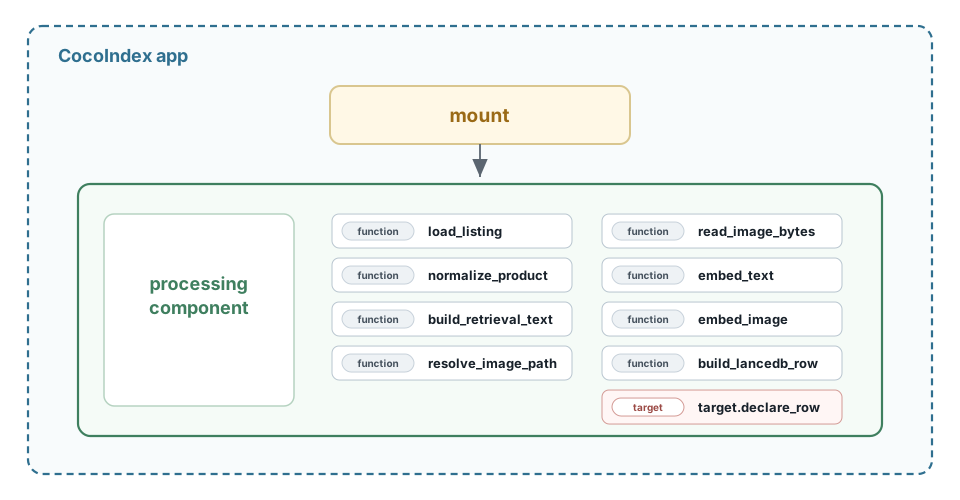
For our pipeline, we use mount_each here, which mounts one processing component per item in a keyed iterable. Since we want a component per product, we point it at our listing files and let it fan the source out into one component run each. That’s the picture below: a single mount turns the source into many component runs, each owning its function chain and target row.
source = localfs.walk_dir(
    LISTINGS_DIR,
    path_matcher=PatternFilePathMatcher(included_patterns=["*.json"]),
    live=LIVE,
)

products = await coco.mount_each(
    coco.component_subpath("products"),
    process_product,
    source.items(),
    target,
)
await products.ready()
How processing components are defined and mounted is a granularity choice by the developer. We could just as well make one component for the whole dataset, but then one product edit would end up doing full dataset-level work. We could also go finer, with one component per field or chunk, but that would distract from the fact that the main entity we care about is the product row in the target. One component per product is the clean middle, in this case.
With the source, the typed row, the functions, and the per-product mount all defined, app_main now holds the entire pipeline. Zooming out, the whole script follows a simple skeleton: the shared resources, data models, functions, and component from the sections above, then app_main to mount them, and finally the App binding that the CocoIndex CLI loads straight from the file:
import cocoindex as coco
# ...the rest of the imports

# Shared resources, data models, and lifespan (defined above)
# LANCEDB / TEXT_EMBEDDER / IMAGE_EMBEDDER = coco.ContextKey(...)
# class Product / class ProductRow: ...
# @coco.lifespan
# async def coco_lifespan(...): ...

# Transformation functions and the per-product component (defined above)
# @coco.fn(memo=True) async def load_listing(...), normalize_product(...), embed_text(...), ...
# @coco.fn           async def process_product(...): ...

# app_main mounts the source, functions, and target into one pipeline
@coco.fn
async def app_main() -> None:
    ...

# Bind app_main into a runnable App; this is what `cocoindex update` loads
app = coco.App(coco.AppConfig(name=APP_NAME), app_main)


# Optional: keep the file runnable as a plain script too
def main() -> None:
    app.update_blocking()


if __name__ == "__main__":
    main()
Run the pipeline and watch it stay fresh#
Now we run our CocoIndex app! The CocoIndex CLI can run the app in two ways: a one-shot catch-up run and a “live watcher” that continuously tracks changes in the sources and targets.
Run the initial ingest#
At first, we ingest the full source data into LanceDB in a single pass. We scan every listing, run the embedders, and write one ProductRow per product.
Even though the code looks simple, CocoIndex is doing a lot under the hood to batch and concurrently process the data. The rows don’t land in LanceDB one at a time, which is great for efficiency: CocoIndex’s core collects the declared rows and commits them to the target in batched transactions, so LanceDB sees a handful of grouped upserts rather than 1,000 separate write commits.
cocoindex update src/run_pipeline.pyRunning app 'abo-shoes-lancedb' from environment 'default' (db path: data/cocoindex/state.lmdb)
...
[Stats]
✅ app_main: 1 total | 1 added
✅ declare_target_state_with_child: 1 total | 1 added
✅ _MountEachLiveComponent.process: 1 total | 1 added
✅ process_product: 1000 total | 1000 added
⏳ Elapsed: 12.0sAll 1,000 products are written on the first pass in about 12 seconds. There’s no need to manage a separate bulk-ingest pipeline, and once the run exits, the LanceDB store is a complete, clean target that immediately answers queries.
Watch data changes live#
We can run the CocoIndex CLI in “live” mode when we want it to continuously track the source as new data comes in. Adding -L starts the same app and leaves it running as a watcher that’s ready to react to changes in the source or target:
cocoindex update -L src/run_pipeline.py⏳ Ready (took 12.0s) | Watching for changes...We can now test how CocoIndex reacts to the three freshness scenarios we defined earlier.
Delete a listing. Remove one JSON file and the watcher reacts within a second, not the ~12 seconds the one-time full load took. Only that product’s component re-runs; the other 999 are left alone:
✅ process_product: 1001 total | 1000 added, 1 deletedThe table drops to 999 rows: CocoIndex saw the file disappear and immediately removed that product’s row.
Add it back. Restore the file and the row reappears; the table returns to 1,000. The restored file is a fresh source item, so its component runs and writes the row again.
Edit one listing’s title. Change the item_name in another file and that single row updates in place, with the count holding at 1,000. Only the touched product’s component re-runs, so CocoIndex re-embeds the new title text and reuses everything else.
Three freshness scenarios (new, deleted, and changed records), all handled by one running command and a few edits in another terminal.
Handle schema and logic changes#
Source data isn’t the only thing that drifts. The transformation code and the target’s shape change too, and CocoIndex’s logic-based fingerprinting treats those as freshness events of their own.
Schema change. Say we want a new nullable column on the row. We add it to the model and re-run the usual command, no migration step required:
@dataclass(frozen=True)
class ProductRow:
    ...
    metadata_json: str
    product_bucket: str | None = None
# Rerun the pipeline, let CocoIndex handle the updates
cocoindex update src/run_pipeline.py✅ process_product: 1000 total | 1000 reprocessedCocoIndex adds the column and leaves it NULL for all 1,000 rows, without rewriting them. The 1000 reprocessed count looks alarming, but nothing expensive reran: every component’s text and image embeddings were served straight from the memo cache.
Logic change. Now we want that column to hold a real value, computed by a function and wired into the component. We add the function and re-run the same command:
@coco.fn(memo=True)
def compute_product_bucket(product: Product) -> str:
    brand = product.brand or "unknown-brand"
    product_type = product.product_type or "unknown-type"
    normalized_brand = "-".join(brand.lower().split())
    normalized_type = "-".join(product_type.lower().split())
    return f"{product.domain_name}:{normalized_type}:{normalized_brand}"
cocoindex update src/run_pipeline.py✅ process_product: 1000 total | 1000 reprocessedEvery row now carries a product_bucket. This run does operate on all 1,000 rows to backfill the new column, but the embeddings come from the memoized cache rather than being recomputed. The new transformation function compute_product_bucket is a cheap string operation, and runs relatively quickly.
The most important pattern worth noticing is this: At any point in time, CocoIndex watches for changes in both the source and the target, while capturing changes to data, schema, and logic. 🚀
Query the data in LanceDB#
Now that LanceDB holds the image bytes, the metadata, and text/image embeddings in one place, we can do a multimodal search. We encode a natural-language query with the same CLIP model and run a vector search against the image embeddings.
from io import BytesIO

import lancedb
from PIL import Image
from sentence_transformers import SentenceTransformer

db = lancedb.connect("data/lancedb")
table = db.open_table("abo_shoes")

# CLIP puts text and images in the same vector space, so a text query
# can search the image vectors directly.
clip = SentenceTransformer("clip-ViT-B-32")
query = "brown leather lace-up boots"

results = (
    table.search(
        clip.encode(query),
        vector_column_name="image_embedding"
    )
    .limit(3)
    .select(["title", "brand", "product_type", "image_bytes", "metadata_json"])
    .to_list()
)

# The image bytes live in each row, so there's no second lookup: we open
# every match's product image straight from the query result.
for row in results:
    print(row["title"], "—", row["brand"], f"({row['product_type']})")
    Image.open(BytesIO(row["image_bytes"])).show()
The query above ranks the products by their similarity score and, in a single fetch, returns the image bytes and the metadata. Here are the top hits:

With the retrieval-ready data in LanceDB, we can now build a multimodal search interface that returns both the product metadata and the product images in one shot, using an agent on top. And thanks to CocoIndex, the agent will always receive the freshest data, no matter how often the source changes.
How the primitives come together#
Let’s recap the features of the CocoIndex app we just built: at no point did we ever write a custom diff or our own change detector, nor did we have to manage any complicated batch jobs to track state. The freshness of the target is a natural consequence of the primitives defined in CocoIndex and how they interact.
Let’s revisit how these primitives come together in the finished pipeline:
- The app is the topmost level we operate at, which we ran via the CLI. Its lifespan binds the shared resources once (the state DB, the LanceDB connection, both embedders), and the same app can run as either an initial bulk catch-up job or a live watcher that continuously tracks for changes.
- The source is the raw data that CocoIndex observes and fingerprints. A file that appears, changes, or vanishes is exactly what it watches for, so new and deleted listings reach the target with no extra wiring.
- The functions (
load_listing,normalize_product,embed_text,embed_image, and friends, each marked@coco.fn(memo=True)) are tracked and, if needed, memoized to avoid wasteful recomputation. A function is recomputed only when its input or its own code fingerprint changes, so changing file names (while keeping the content the same) doesn’t trigger a re-embed, but changing the embedding model or the file’s content does. - The processing component is the unit of incremental execution, and its boundaries are decided by the mount path. The developer has all the flexibility to decide at what level of granularity functions can be grouped, and recomputed once a change is detected.
- The target (in this case, the LanceDB
ProductRowtable, declared withdeclare_row) is the desired state we asked CocoIndex to maintain. Reconciling against that declaratively is what turns a missing source file or value into a dropped row or field, and a new field on the model into a column added in place.
Handling each kind of staleness we covered earlier in this post benefits from specific CocoIndex primitives: the source watches for new and changed records, function fingerprints watch for logic changes, the target declaration watches for schema changes, and the granularity of the processing component decides how much any one of them costs to update and keep fresh.
Takeaways#
Everything we built here flows into a single target, LanceDB, through its connector. But it’s worth clarifying that CocoIndex doesn’t box you into any one source or target. Writing your own connector is genuinely simple, because CocoIndex exposes all the right hooks for you to plug into whatever sources and targets your app needs. You can even wire up multiple sources and targets in one app, which is something I’d love to dig into in a future post.
The versatility of CocoIndex across many different sources and targets is clear, so what could push it into the hands of an even wider user base? Right now there are Python and Rust SDKs. Once a TypeScript SDK becomes available, a much larger pool of frontend and full-stack developers gets to build on these same primitives. We all saw what React.js did for the frontend world, and to me CocoIndex sits squarely in that same mold - React for data - which feels like a very natural fit.
Today, in its open source form, all of CocoIndex’s compute runs on a single machine, tightly bound to your app because it’s a runtime. In the future, it would be fascinating to see a distributed “fleet of cocos” that can run much bigger production workloads. An enterprise version of CocoIndex ⤴ with large-scale distributed computing features is already in the works, and I can’t wait to see what capabilities it will bring on top of the open source version.
We know that agents are only as good as the context they’re handed, so data freshness is important. The pace at which agents now query data systems is exactly what is forcing freshness paradigms to evolve. Running batch jobs and living with “stale data windows”, or over-provisioning compute resources, simply won’t cut it when an agent is asking questions in real time. That’s the whole appeal of an incremental-first runtime: the target keeps up with the source on its own, no matter which source changes first.
The CocoIndex documentation is an excellent place to stop by if you want to go deeper, so I’ll leave things here with a few links below to the most useful resources to continue your journey with CocoIndex and its awesome community. Till next time! 🚀
- The companion repo for this post, with all the code: thedataquarry/cocoindex-v1-intro ⤴
- CocoIndex’s core concepts guide ⤴, a really nicely illustrated walkthrough of the same primitives we covered here
- The CocoIndex Discord ⤴, to hang out and chat with the community 👋
Footnotes#
-
Incremental processing means CocoIndex tracks what changed at the source and recomputes only the work that change affects, rather than reprocessing everything on every run. Dig deeper into this philosophy by reading more in the previous post. ↩
-
If you use the ABO dataset in any derived work from this post, cite their CVPR 2022 paper ⤴ as the source. The dataset can be downloaded from the official source ⤴. ↩
-
A declarative approach means we describe what should be true of the target and let CocoIndex work out how to make it true, instead of spelling out each step ourselves. It’s one of the five design principles from the previous post. ↩