How I 5x my writing throughput with AI
Ideas on how to use AI to write faster without losing authenticity or 'human-ness' in your writing.
When it comes to writing blog posts, I’ve never lacked ideas. The main issue for me has always been the cost of turning a sea of ideas (mostly random notes, or casual thoughts in my head) into finished posts of high quality. A typical technical blog post used to take me a minimum of 5-8 hours to prepare for and write. During a typical work week, those were added hours I needed to carve out on top of the 40-50 hours I spent working at my day job. All of that had to happen, alongside life, and other things.
Lately, thanks to AI, I’m finding that my average writing cycle (for moderately long technical posts) has dropped significantly as I get better at using AI tools. I’m seeing a 5-8x efficiency gain. This post was written mainly to highlight that the increase in efficiency is not purely because text is being output faster — it’s because I’ve rewired my writing process by applying AI in various stages of the workflow.
How my views on AI-generated content have evolved#
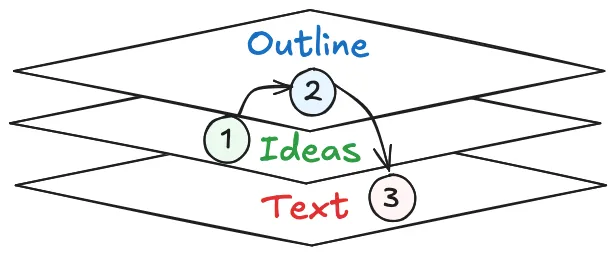
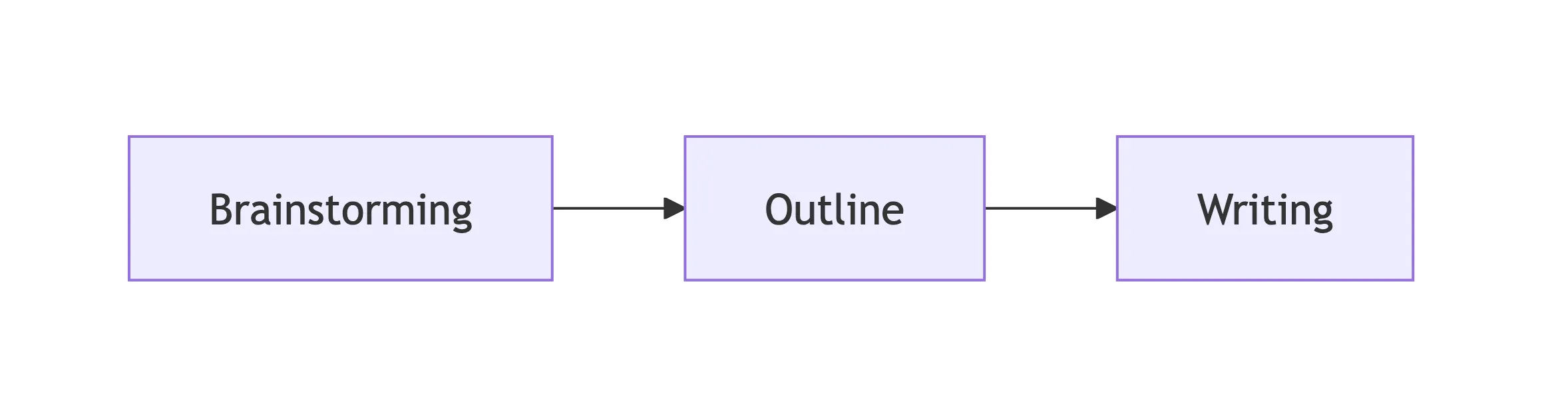
In my earlier post “A framework for technical writing in the age of LLMs” from December 2025, I wrote that I was skeptical of outsourcing ideation and outlining to LLMs. I mentioned that I wanted to see more authentic, human-written content, “for and by humans” in 2026. That viewpoint is still the same, even today. The figure below highlights the different stages of writing I mentioned in that earlier post: first the ideas, then the outline, and finally the actual prose.
What’s changed is my view on the mechanics of ideation and writing. Like most developers, I’ve gone from writing code character-by-character in an IDE to having AI agents write all the code. Writing in natural language is on the same trajectory. AI is now core to both ideation and drafting, and the more I work with the latest models and agent harnesses, the more natural that feels.
But human ownership of the ideas and the overall narrative remains non-negotiable. I don’t want AI slop, and neither does anyone reading technical posts. I still care deeply about authentic content that reflects lived experience and judgment. Only I know what story I want to tell and why it matters.
This post highlights the specific workflow I’ve been using to great effect, including for this very post.
Step 1: dump your ideas and story into a seed prompt#
The first step is externalizing everything in my head. I dump all my rough thoughts into a seed prompt. Sometimes I use Wispr Flow ⤴ to dictate, and other times I type them out myself — in either case, the goal is to capture the full shape of an idea and to craft a narrative before the thoughts fade.
Into this seed prompt, I bake in the premise of the post, rough arguments, examples or references I want to include, things I want to contrast against, strong opinions and caveats. It doesn’t need to be polished. It just needs to be there.
The seed prompt is the intellectual source of truth and a grounding medium for the AI agent downstream. Everything that follows builds on this foundation, so it’s worth spending a few minutes crafting it and externalizing as much as possible before moving on to the next step.
Step 2: use a brainstorming skill to turn ideas into an outline#
In my early days using coding agents, I used to just enter the seed prompt in “plan mode” to get the agent to generate a plan, and then ask it to use the plan to begin writing. However, the more I did this, I realized that the model was just aiming to get me an output as soon as possible (as it’s trained to do). Oneshot planning is not enough.
Technical writing is very much an iterative process. To write well, a single plan isn’t enough to flesh out a complex post, because while dumping my thoughts, I may have had conflicting ideas, or I may have entirely missed other important points that I actually wanted to include.
As a result, it’s crucial to have a “brainstorming” step prior to planning. Rather than go free form and prompt the model to brainstorm with me, I use this brainstorming skill ⤴ adapted from the one written by my good friend Noorain Panjwani ⤴ — feel free to copy and adapt it for your own needs!
To use the skill, I just point the agent to it (in Claude Code, it’s a slash command: /use brainstorming) and then prompt it to brainstorm with me on the seed prompt. The skill is designed to be iterative, so I can go back and forth with the model as much as needed until we arrive at an outline that feels right.
The purpose of the brainstorming skill isn’t to generate writing ideas for you — it’s to help you clarify your own thinking. When prompted to use the skill, the agent takes the seed prompt, reasons over it, ideates with you, asking questions where necessary, and finally outputs a new local artifact file (the skill specifically asks for an HTML artifact). AI is your partner, not your guide, during this process.
The artifact file is neatly organized into sections, with HTML/CSS widgets and a concrete flow and notes contained in bullet points. This provides initial structure and guidance for the next step of drafting, but it is not a final outline. The brainstorming step is iterative and can be repeated as many times as needed until the outline feels right. The artifact from brainstorming only serves as the baseline for the writing stage, which comes later.
Step 3: first human checkpoint (vet the outline)#
Before proceeding to writing, however, it’s time to take a step back and read the outline (as a human) critically. This is the moment where I can quickly tell whether the story still feels like mine. The brainstorming skill does a good job of organizing my raw thoughts, but organization alone isn’t enough. I need to verify that the structure actually serves the story I want to tell.
When I review, I’m looking at a few specific things:
- Does this match my intent? The sections should reflect the experience or argument I set out to write about, not some adjacent topic the model found more interesting.
- Are the section boundaries sensible? Sometimes the model splits a single idea across two sections, or lumps two distinct points together. Easy fixes, but they matter for pacing.
- Is the overall flow coherent? I read the section headings in order and ask whether a reader would feel a natural progression from one to the next.
- Did the model overreach? Models love to generalize. They’ll occasionally introduce framings that sound plausible but don’t reflect my lived experience. Those get cut immediately.
If the outline feels wrong after this review, I don’t proceed to drafting. Full stop. It’s tempting to push forward and “fix it later,” but I’ve learned that a flawed outline leads to a flawed draft, which leads to frustrating rewrites that eat up exactly the time this workflow is supposed to save. Going back to the brainstorming step costs minutes. Salvaging a misdirected draft costs hours.
This checkpoint is very important because it’s what keeps the workflow human-directed rather than AI-driven. The model can generate prose all day long, but I’m the one who decides whether the structure of that prose faithfully represents what I actually want to say.
Step 4: Write one section at a time#
Once I’m happy with the outline, I start a fresh agent session for fleshing out the sections rather than continuing the brainstorming conversation. A clean context keeps the model focused on writing well rather than carrying over stale back-and-forth information from the ideation phase.
For doing the writing, I currently use Claude Opus 4.6 (1M) because I find it stronger on vibe and storytelling ability. Its writing just feels more “human”. Maybe that’s because of Anthropic’s SOUL.md ⤴? I don’t know if future GPT models will incorporate something like it, but as of April 2026, Claude wins for me hands-down on writing quality and feel.
When writing, I never ask the model to “write the whole post using the outline” in one shot. Instead, I work through each section, one at a time:
- Expand only the current section. This keeps the output focused and makes it much easier to course-correct if something drifts.
- Use the outline bullets as constraints. Each section’s bullet points become the guardrails for what the model should cover in that task. It also makes the review process easier, because the scope is localized.
- Manage transitions explicitly. I ask the model to handle paragraph flow from the previous section into the current one, so the post reads as a connected narrative rather than a series of isolated blocks.
This sequential process yields great results, using simple prompts like this:
Look at the first section of the outline. Let’s flesh out only that section, using the bullet points as a guide.
Once the first section is done, the model has the context of the session in memory. Review the section output, make any corrections to verbiage/style as you see fit, and then it’s trivial to prompt it again to move on to the next section:
Great, that looks good. Proceed to flesh out the next section.
When done incrementally like this, the model pays attention to the overall flow, ensuring continuity between sections. The post largely begins writing itself at this point! All because we had a good outline from the brainstorming session, and a clear process for fleshing it out.
Step 5: second human checkpoint (edit for voice)#
AI-written prose is never the final output. No matter how good models are today (or will become in the future), I always rewrite parts of the draft as how I would naturally express them. Rather than being a pure writer, I become an editor of the AI’s output, tweaking the voice and style to make it sound more like me. This is where the “human-ness” comes in.
The things I tend to edit fall into a few categories:
- Word choice. If a word feels too formal or too generic, I swap it for something I’d actually say out loud.
- Emphasis. I adjust where italics and bold land, because the model doesn’t always know what I think is the most important part of a sentence.
- Transitions. The connections between paragraphs sometimes feel mechanical. A quick rewrite here makes the post flow more naturally.
- The inevitable “AI smell.” Every model leaves its trace. Em dashes are a classic one: in my own writing, I use them sparingly, but most models scatter them everywhere. Once you start noticing these patterns, they’re impossible to unsee.
So even when AI helps massively speed up the writing process, there’s always that one final pass needed to be done by the human. This requires a certain degree of taste and judgment.
Why this works especially well for technical posts#
Technical writing is a particularly good fit for this workflow because the agent has access to the same repo and code that I’m working on. This isn’t a generic chatbot UI where I have to paste in snippets and hope the model understands the surrounding context. The agent can see (and directly go into):
- Actual source files to learn their structure
- Real code paths that the post references
- Implementation details that would be tedious to explain from scratch
- Working examples that can be quoted or summarized accurately
This makes a huge difference. The writing and code examples can reinforce each other naturally, instead of feeling like two disconnected artifacts stitched together at the end. When the model can read the code it’s writing about, it produces explanations that are grounded in reality rather than plausible-sounding approximations.
The win here isn’t that AI is only helping with faster writing. It’s helping with narrative integration across text and code, which is arguably the hardest part to get right in technical writing.
What changed in practical terms#
I’ve moved away from a naive “plan-then-write” approach to a more sophisticated writing flow as follows:
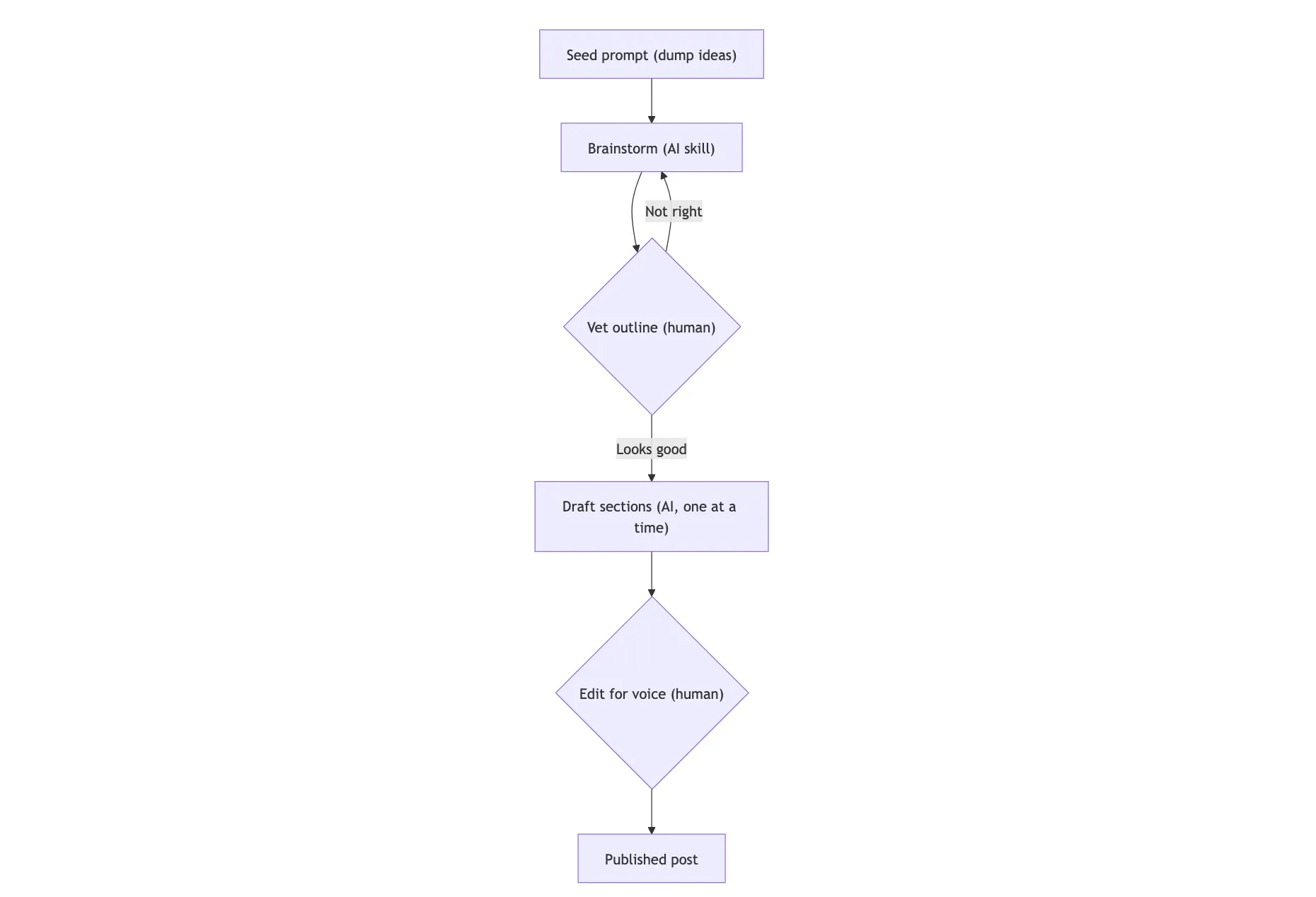
The before-and-after here is stark. Previously, many of my ideas died on the vine because the path from “interesting thought” to “coherent draft” required me to spend too many hours in front of the computer. I’d jot something down, get excited about it, and then stall once I realized how many hours of focused writing or coding lay ahead. Most weeks, those hours didn’t exist, so I just postponed many of my posts indefinitely.
Now, I can go from raw thoughts to a vetted outline to section drafts in a small fraction of the time. What used to take 5-8 hours, or more, of active writing now regularly comes in under 2. That’s the 5x gain I mentioned at the top, and it’s held up consistently across multiple posts. Case in point: this post itself wouldn’t have existed if I hadn’t had AI ideate with me and help me write it in a fraction of the time it would otherwise have taken.
For me, writing a lot faster isn’t satisfying on its own — it’s the consistency that comes with it that matters. Reducing the friction of writing means more ideas survive long enough to become real posts. And the more I write, the more time I spend digging into the internals of new systems, sharing my insights, and exploring a broader range of technical topics. This is exactly why I started blogging in the first place, all those years ago!
Conclusions#
If there’s one thing I want you to take away from this post, it’s this: we’re all going to have to learn to adapt to using AI in whatever we do, including writing. When it comes to high-quality technical content, treat AI as the efficiency engine, not the storyteller. The human remains responsible for the ideas, the intent, the outline, the voice, and the final narrative. None of that gets outsourced to AI, otherwise we end up in a world of AI-generated slop ⤴.
As models and harnesses continue to evolve at a rapid pace, I’m sure my workflow will keep evolving. I’m also sure I’ll be modifying skills like the brainstorming ⤴ one I use regularly, and adding new writing skills ⤴ as I learn more about how to work with the latest generation of models. What I described here might look different six months from now, and that’s fine — the core principles should still hold.
The key takeaway for me is that authenticity in writing doesn’t mean rejecting AI outright. It requires keeping humans in control of what is being said and why. As long as that stays true, I’ll continue writing this way. Hope you enjoyed this post, and stay tuned for a lot more from me in the coming weeks! 🚀